
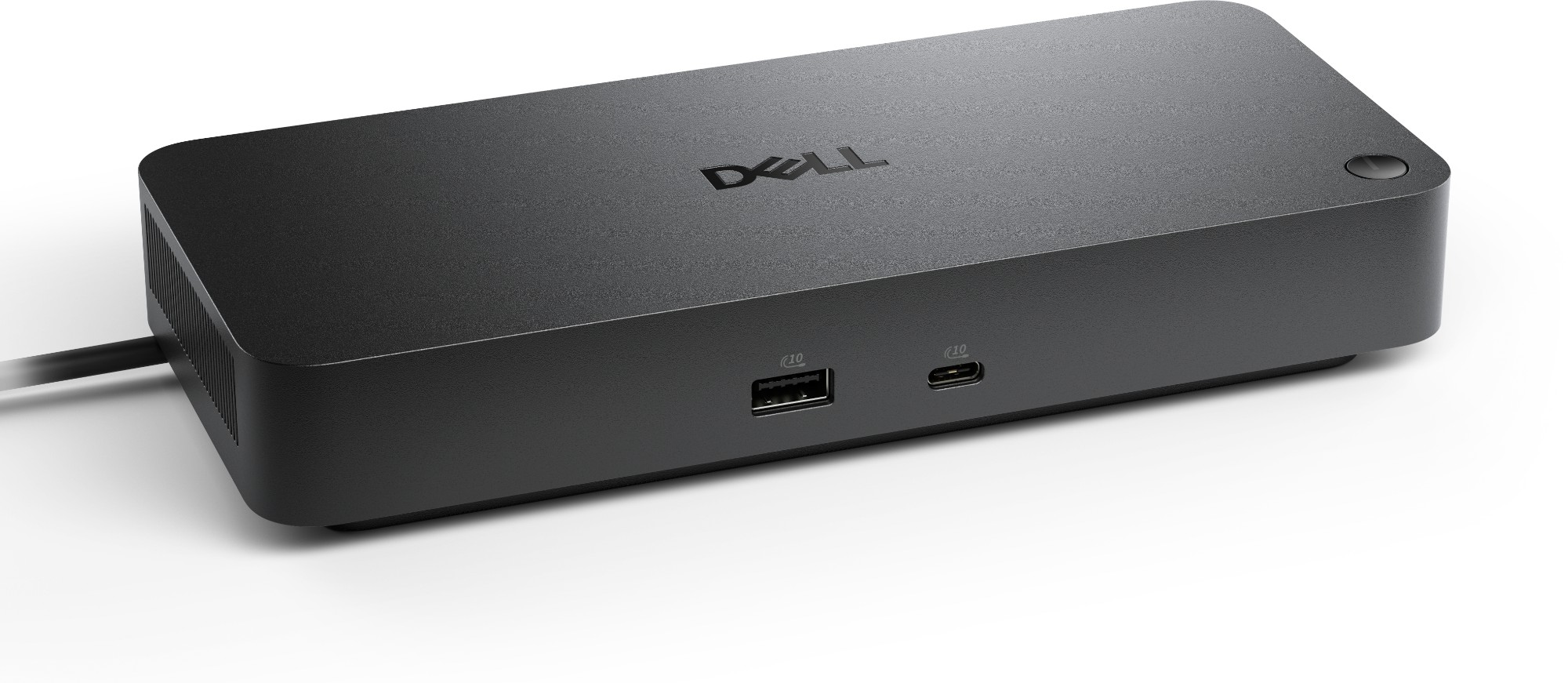


DELL WD25 Wired USB 3.2 Gen 2 (3.1 Gen 2) Type-C Black
- Brand: DELL
- Category:
- SKU: DELL-WD25
- EAN: 0884116493662 0884116493679 53 ...6493679 5397184961759 5715063806302 0884116493686 2000001364345 5715063805930 5397184961742 5397184961735more
Offer details
Trade Prices
| Distributor | Product | SKU | Stock | Updated | Price |
|---|---|---|---|---|---|

|
Dell Pro Dock WD25 |
210BRPXCA | |||

|
DELL PRO DOCK - WD25 |
EQ3089 |
Related Products
- Webcams
- Computer Monitors
- Headphones & Headsets
- Signage Displays
- Video Conference Monitors
- Warranty & Support Extensions
- Speakerphones
- Keyboards
- Laptops
- All-in-One PCs/Workstations


-
 Category: Computer Monitors
-
 Category: Computer Monitors
-
 Category: Computer Monitors
-
 Category: Computer Monitors
-
 Category: Computer Monitors
-
 Category: Computer Monitors
-
 Category: Computer Monitors
-
 Category: Computer Monitors
-
 Category: Computer Monitors
-
 Category: Computer Monitors
-
 Category: Computer Monitors
-
 Category: Computer Monitors
-
 Category: Computer Monitors
-
 Category: Computer Monitors
-
 Category: Computer Monitors
-
 Category: Computer Monitors
-
 Category: Computer Monitors
-
 Category: Computer Monitors
-
 Category: Computer Monitors
-
 Category: Computer Monitors
-
 Category: Computer Monitors
-
 Category: Computer Monitors
-
 Category: Computer Monitors
-
 Category: Computer Monitors
-
 Category: Computer Monitors
-
 Category: Computer Monitors
-
 Category: Computer Monitors
-
 Category: Computer Monitors
-
 Category: Computer Monitors
-
 Category: Computer Monitors
-
 Category: Computer Monitors
-
 Category: Computer Monitors
-
 Category: Computer Monitors
-
 Category: Computer Monitors
-
 Category: Headphones & Headsets
-
 Category: Signage Displays
-
 Category: Video Conference Monitors
-
 Category: Video Conference Monitors
-
 Category: Video Conference Monitors
-
 Category: Video Conference Monitors
-
 Category: Video Conference Monitors
-
 Category: Warranty & Support Extensions
-
 Category: Warranty & Support Extensions
-
Category: Warranty & Support Extensions


-
 Category: Laptops
-
 Category: Laptops
-
 Category: Laptops
-
 Category: Laptops
-
 Category: Laptops
-
 Category: Laptops
-
 Category: Laptops
-
 Category: Laptops
-
 Category: Laptops
-
Category: Laptops
-
Category: Laptops
-
Category: Laptops
-
 Category: Laptops
-
 Category: Laptops
-
 Category: Laptops
-
Category: Laptops
-
Category: Laptops
-
Category: Laptops
-
Category: Laptops
-
Category: Laptops
-
Category: Laptops
-
Category: Laptops
-
 Category: Laptops
-
 Category: Laptops
-
 Category: Laptops
-
 Category: Laptops
-
 Category: Laptops
-
 Category: Laptops
-
Category: Laptops
-
Category: Laptops
-
Category: Laptops
-
Category: Laptops
-
Category: Laptops
-
Category: Laptops
-
 Category: Laptops
-
Category: Laptops
-
Category: Laptops
-
Category: Laptops
-
Category: Laptops
-
Category: Laptops
-
Category: Laptops
-
Category: Laptops
-
 Category: Laptops
-
Category: Laptops
-
Category: Laptops
-
Category: Laptops
-
Category: Laptops
-
Category: Laptops
-
Category: Laptops
-
 Category: Laptops
-
 Category: Laptops
-
Category: Laptops
-
Category: Laptops
-
 Category: All-in-One PCs/Workstations
-
 Category: All-in-One PCs/Workstations
-
Category: All-in-One PCs/Workstations
-
Category: All-in-One PCs/Workstations
Reasons To Buy

Fuel your productivity
Gain the versatility to create your ideal workspace with a dock featuring 6 USB ports, support for 4 displays and driving up to 100W of power delivery to the latest Dell AI PCs for optimal productivity.
More manageable
Keep your dock up to date and work without interruption.<br><br>Improved manageability<br>Manage your dock from the Dell Device Management Console by utilising Dell Display and Peripheral Manager installed on your PC.<br><br>Simplify firmware updates<br>Reduce IT complexity by deploying a single firmware file across workspaces.<br>Minimise end-user disruption with silent firmware updates that are executed upon dock disconnection.<br><br>Work with confidence<br>Enhance your docking experience with universally compatible features including MAC Address Pass-Through and Power Button Sync, for a better docking experience across brands.


Connect your way
Configure your workspace to your liking with an ambidextrous USB-C cable that can be routed left or right.
Designed for sustainability
The Dell Pro Dock is built with at least 65% post-consumer recycled materials and packaged with 100% recycled or renewable packaging, and offering up to 72% power consumption reduction on standby mode.

Description
Specifications
| Ports & interfaces | |
|---|---|
| Connectivity technology | Wired |
| USB 2.0 ports quantity | 0 |
| Host interface | USB 3.2 Gen 2 (3.1 Gen 2) Type-C |
| USB 3.2 Gen 1 (3.1 Gen 1) Type-A ports quantity | 0 |
| USB 3.2 Gen 2 (3.1 Gen 2) Type-A ports quantity | 4 |
| USB 3.2 Gen 2 (3.1 Gen 2) Type-C ports quantity | 2 |
| Ethernet LAN (RJ-45) ports | 1 |
| HDMI ports quantity | 1 |
| HDMI version | 2.1 |
| DisplayPorts quantity | 2 |
| Microphone in | No |
| Headphone outputs | 0 |
| DC-in jack | Yes |
| USB Power Delivery (USB PD) | Yes |
| USB Power Delivery up to | 100 W |
| DisplayPort version | 1.4 |
| USB Type-C DisplayPort Alternate Mode | Yes |
| Network | |
| Ethernet LAN | Yes |
| Ethernet LAN data rates | 10,100,1000,2500 Mbit/s |
| Ethernet LAN (RJ-45) ports | 1 |
| Wake-on-LAN ready | Yes |
| Performance | |
| Product colour | Black |
| Card reader integrated | No |
| Cable lock slot | Yes |
| Number of displays supported | 4 |
| Maximum digital resolution | 6144 x 3456 pixels |
| Data transfer rate | 2500 Gbit/s |
| Charging function | Yes |
| Cable lock slot type | Kensington |
| Maximum refresh rate | 60 Hz |
| Storage | |
| Card reader integrated | No |
| Power | |
| Power source type | DC |
| Power connector | USB Type-C |
| Power supply | 130 W |
| Software | |
| Windows operating systems supported | Windows 10, Windows 11 |
| Mac operating systems supported | Yes |
| Linux operating systems supported | Yes |
| Other operating systems supported | ChromeOS |
| Weight & dimensions | |
| Width | 3.54" (90 mm) |
| Depth | 1.39" (35.2 mm) |
| Height | 8.07" (205 mm) |
| Weight | 19.4 oz (550 g) |
| Design | |
| Product colour | Black |
| Cable lock slot | Yes |
| Windows operating systems supported | Windows 10, Windows 11 |
| Mac operating systems supported | Yes |
| Cable lock slot type | Kensington |
| Packaging content | |
| Quick start guide | Yes |
| Cables included | Power |
| AC adapter included | Yes |
| Carbon footprint | |
| Total carbon footprint (kg of CO2e) | 91 |
| PAIA version | Dell PCF Calculator/GaBi version 1 2025 |
| Carbon emissions, energy usage (kg of CO2e) | 60.5 |
| Carbon emissions, manufacturing (kg of CO2e) | 27.39 |
| Carbon emissions, logistics (kg of CO2e) | 2 |
| Carbon emissions, end-of-life (kg of CO2e) | 0.82 |
| Technical details | |
| Total carbon footprint (kg of CO2e) | 91 |